



Computer Science
Computer Networking
TCP/IP 5 Layer Network Model
The TCP/IP 5-Layer Network Model in 2026: Why Every Developer Needs to Understand How the Internet Actually Works
You click a button. Data travels 10,000 miles in milliseconds. The page loads. That's not magic = it's the TCP/IP model working exactly as designed. And if you don't understand it, you can't debug it when it breaks.
The Question Nobody Asks Until Production Breaks
Your API is running fine locally. You deploy to staging. Everything works. You push to production. Suddenly, requests time out. Users report intermittent errors. The database connection keeps dropping. The mobile app can't reach the server. The logs show nothing useful.
You're staring at errors that say "connection refused," "timeout exceeded," "network unreachable" = but you don't actually know what those mean. You don't know the difference between a DNS issue, a firewall rule blocking traffic, a misconfigured load balancer, or a TCP handshake failure. You're a backend developer who built an API, but you don't understand the network that carries the data.
This is the gap the TCP/IP model fills. Not because you need to memorize OSI layers for an exam, but because when production breaks = and it will = you need to know which layer the problem is happening at. Is it a cable? Is it routing? Is it a firewall? Is it your code?
The TCP/IP model is the map that shows you how data travels from your laptop to a server halfway around the world. And in 2026, where every application is distributed across clouds, regions, and continents, understanding that map is not optional.
What the TCP/IP Model Actually Is
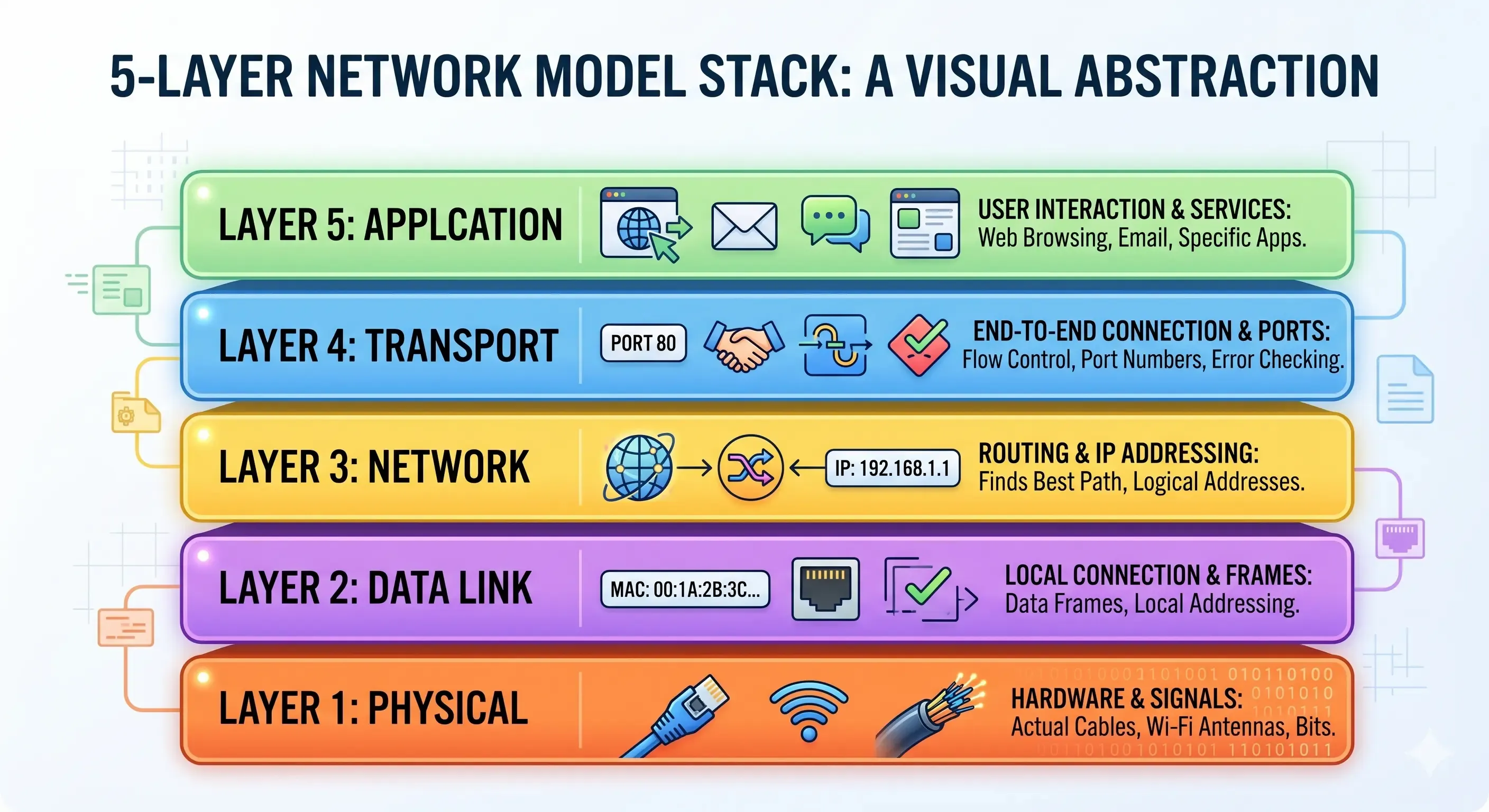
The TCP/IP model (also called the Internet Protocol Suite) is a conceptual framework that describes how data moves across networks. It divides the networking process into five distinct layers, each with a specific responsibility. Data flows down the layers when sending, and up the layers when receiving.
Think of it like mailing a physical letter:
- You write the letter (Application layer = the data you want to send)
- You put it in an envelope with an address (Transport layer = adds delivery details)
- The postal service routes it between cities (Network layer = finds the path)
- Trucks and planes physically carry it (Data Link & Physical layers = the actual movement)
- The recipient opens the envelope and reads the letter (reverse process)
Each layer only talks to the layers directly above and below it. The application layer doesn't care about cables. The physical layer doesn't care about HTTP. This separation of concerns is what makes the internet scalable.
The Five Layers, Explained from Bottom to Top
Layer 1: Physical Layer = The Wires and Signals
What it does: Transmits raw bits (0s and 1s) over a physical medium = copper cables, fiber optic cables, or radio waves (Wi-Fi).
Real-world examples:
- Ethernet cables (Cat5e, Cat6)
- Fiber optic cables in undersea internet cables
- Wi-Fi radio signals (2.4 GHz, 5 GHz)
- Bluetooth
Key concepts:
- Bits per second (bandwidth)
- Signal voltage levels
- Cable specifications
- Physical connectors (RJ45, USB-C, etc.)
When things go wrong here: "No internet connection." Literally = the cable is unplugged, the Wi-Fi signal is too weak, or the network card is broken.
Layer 2: Data Link Layer = Making Sense of the Signals
What it does: Defines how to interpret the physical signals into frames of data. It also handles communication between devices on the same local network (like your laptop talking to your router).
Key protocol: Ethernet (for wired networks), Wi-Fi (802.11 for wireless)
Key concept: MAC addresses (Media Access Control addresses) = unique hardware identifiers for every network device. Example:
00:1A:2B:3C:4D:5EWhen your laptop sends data to your router, the data link layer wraps it in a frame that says "From MAC address A to MAC address B."
Real-world analogy: If the physical layer is the road, the data link layer is the delivery truck driving on that road within a single neighborhood.
When things go wrong here: "Connected to Wi-Fi but no internet." The physical connection works, but something at the data link layer (wrong network, no DHCP lease, switch misconfiguration) is broken.
Layer 3: Network Layer = Routing Across the Internet
What it does: Routes data between different networks. This is the layer that makes the internet interconnected = it's how data gets from your home network in India to a server in California.
Key protocol: IP (Internet Protocol) = both IPv4 and IPv6
Key concept: IP addresses = logical addresses that identify devices on the internet. Example:
192.168.1.100 (private IP) or 8.8.8.8 (Google's public DNS server)Every device on the internet has an IP address. Routers use these addresses to forward packets (chunks of data) from source to destination, hopping through multiple networks until they arrive.
Real-world analogy: The postal service routing a letter between cities. Each post office (router) reads the destination address and forwards the letter to the next post office closer to the destination.
When things go wrong here: "Host unreachable." The network layer can't find a route to the destination. This could be a DNS issue, a firewall blocking traffic, or a routing table misconfiguration.
Tools for debugging:
ping, traceroute, dig, nslookupLayer 4: Transport Layer = Ensuring Reliable Delivery
What it does: Manages end-to-end communication between applications. While the network layer gets data from one machine to another, the transport layer ensures it gets to the right application on that machine = and that it arrives reliably and in order.
Key protocols:
TCP (Transmission Control Protocol) = Reliable, connection-oriented. Guarantees that data arrives in order and without errors. Used for HTTP, HTTPS, SSH, email.
UDP (User Datagram Protocol) = Unreliable, connectionless. Faster but doesn't guarantee delivery or order. Used for video streaming, VoIP, online gaming, DNS queries.
Key concepts:
Ports = Numbers that identify specific applications on a machine. Example:
- Port 80 → HTTP
- Port 443 → HTTPS
- Port 22 → SSH
- Port 3306 → MySQL
- Port 5432 → PostgreSQL
When you access
https://example.com, you're really connecting to example.com:443 (IP address + port).TCP handshake (three-way handshake):
- Client sends SYN (synchronize)
- Server responds with SYN-ACK (synchronize-acknowledge)
- Client sends ACK (acknowledge)
Now the connection is established, and data can flow.
Real-world analogy: TCP is like certified mail with tracking and delivery confirmation. UDP is like throwing a message in a bottle into the ocean = maybe it arrives, maybe it doesn't, but it's fast.
When things go wrong here: "Connection timeout," "Connection refused." The server isn't listening on that port, a firewall is blocking it, or the TCP handshake failed.
Tools for debugging:
telnet, nc (netcat), curl, nmapLayer 5: Application Layer = The Protocols You Actually Use
What it does: Defines the high-level protocols that applications use to communicate. This is where HTTP, HTTPS, FTP, SMTP, DNS, SSH, and every other application-specific protocol lives.
Key protocols:
HTTP/HTTPS = The web. Your browser requests a webpage, the server sends it back. Port 80 (HTTP) or 443 (HTTPS).
DNS = Domain Name System. Translates human-readable domain names (
google.com) into IP addresses (142.250.185.78). Port 53.SMTP/IMAP/POP3 = Email. SMTP sends email, IMAP and POP3 retrieve it.
FTP/SFTP = File transfer.
SSH = Secure shell for remote server access. Port 22.
WebSockets = Real-time bidirectional communication. Used in chat apps, live dashboards, multiplayer games.
Real-world analogy: The application layer is the language being spoken between sender and receiver. The lower layers are just the delivery mechanism = they don't care whether you're sending an email or streaming a video.
When things go wrong here: "404 Not Found," "500 Internal Server Error," "SSL certificate invalid." These are application-layer errors = the network is fine, but something at the HTTP or TLS level is broken.
How It All Fits Together: A Real Example
You type
https://example.com into your browser and press Enter. Here's what happens at each layer:Application Layer (Layer 5):
- Browser constructs an HTTP GET request:
GET / HTTP/1.1 - TLS/SSL handshake encrypts the connection (HTTPS)
Transport Layer (Layer 4):
- TCP wraps the HTTP request in a segment
- Adds source port (random high number like 54321) and destination port (443 for HTTPS)
- Establishes a TCP connection with the server via three-way handshake
Network Layer (Layer 3):
- DNS lookup: browser asks "What's the IP address of example.com?" → gets back
93.184.216.34 - IP wraps the TCP segment in a packet
- Adds source IP (your public IP) and destination IP (
93.184.216.34) - Routers forward the packet across the internet, hopping through multiple networks
Data Link Layer (Layer 2):
- Ethernet or Wi-Fi wraps the IP packet in a frame
- Adds source MAC address (your device) and destination MAC address (your router)
- Sent over your local network
Physical Layer (Layer 1):
- The frame is converted into electrical signals (Ethernet) or radio waves (Wi-Fi)
- Transmitted across the physical medium
The server receives the signals, and the process reverses = physical → data link → network → transport → application. The server processes the HTTP request, generates a response, and sends it back down the layers.
Your browser receives the response, parses the HTML, renders the page. Milliseconds have passed. You're looking at a website.
Why Backend Developers Need to Understand This
You might think: "I just write APIs in Express. Why do I care about MAC addresses?"
Here's why.
Debugging production issues. When your deployed app can't connect to the database, is it a DNS issue (network layer), a firewall blocking port 5432 (transport layer), or your code using the wrong connection string (application layer)? You can't diagnose it without understanding layers.
Optimizing performance. TCP's congestion control affects how fast your API can send large responses. Understanding this helps you choose when to use HTTP/2 (multiplexing), WebSockets (persistent connections), or CDNs (reducing round trips).
Securing your applications. Firewalls operate at multiple layers. TLS operates at the transport/application boundary. Understanding the model helps you configure security properly.
Working with cloud infrastructure. AWS VPCs, subnets, security groups, load balancers = all of these are network-layer concepts. You can't effectively use cloud platforms without understanding how they route traffic.
Learning Networking as a Developer
Networking isn't taught as a standalone course at Archi's Academy = because it's not a standalone skill. It's woven into the Backend Development track, where you deploy APIs, configure servers, debug connection issues, and work with databases across networks.
Understanding TCP/IP isn't memorizing layers for a quiz. It's knowing how to use
curl to test an endpoint, how to read network logs, how to configure CORS, how to troubleshoot a 504 Gateway Timeout, how to set up HTTPS with SSL certificates, how to connect to a remote database securely.That's where the learning happens = in context, when you need it.
Learn by Doing. Prove by Doing. Get Hired.
Have questions about networking, backend development, or debugging connection issues? The Archi's Academy team is here to help = reach out anytime.

Tuesday, Feb 23, 2021