



Software Development
Story
How a 2-Week AI Bootcamp Gave University Students Hands-On AI Skills They Actually Use
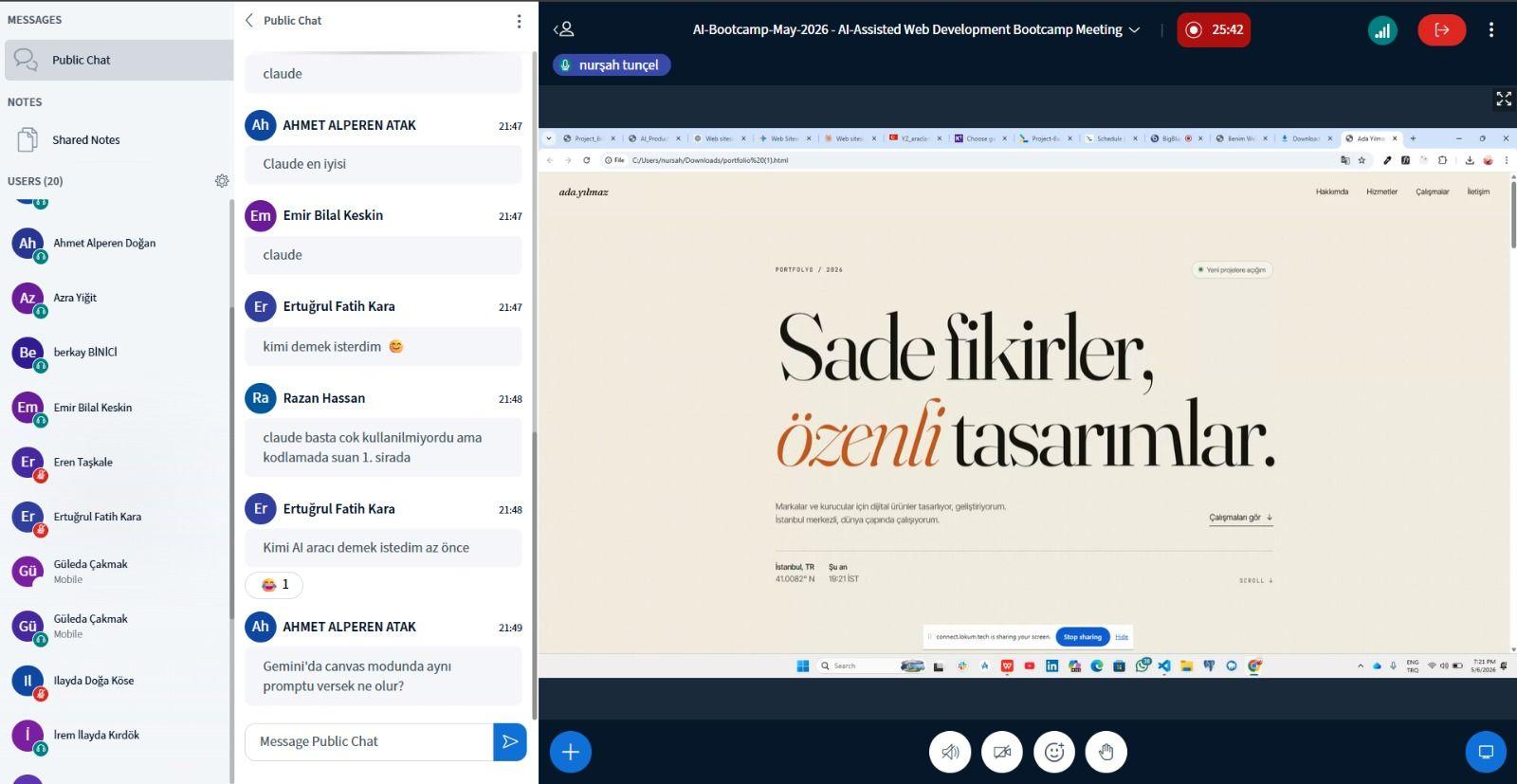
TL;DR: Archi's Academy launched a 2-week AI bootcamp with students from Aydın, Beykent, Arel, and Atlas Universities in Turkey. Instead of lecturing about theory, the program walks participants through a real design-to-code workflow — from structured prompting and AI-generated design to frontend development, debugging, and SEO — using tools like Google Stitch and Antigravity. Every session is built around building one small, tangible piece of a personal portfolio website.
Artificial intelligence is already changing how developers build products, how designers shape interfaces, and how startups go from idea to prototype. That much isn't new. What's new is that most university students still have no practical exposure to these workflows — even the ones studying computer science.
They've used ChatGPT to summarize a paper or generate quiz answers. But when it comes to using AI inside an actual product development cycle? Very few have touched it.
That's exactly the gap that pushed us at Archi's Academy to build something different: a short, intensive bootcamp that trades passive AI consumption for real building.
What Is an AI Bootcamp (And Why Does It Matter for University Students)?
An AI bootcamp is a focused, short-term training program designed to teach practical AI skills through guided, hands-on projects rather than long theoretical lectures.
For university students in particular, the timing couldn't be better. Hiring managers in the software industry are increasingly looking for candidates who can collaborate with AI tools — not just code from scratch, but use AI to accelerate their output. Understanding how to structure a prompt, review generated code, debug AI output, and work inside an AI-assisted development environment is rapidly becoming table stakes.
This bootcamp was created to give students exactly that kind of foundation. Not to make them senior engineers in two weeks — that would be dishonest — but to give them a working mental model they can build on long after the cohort ends.
Why We Built This Program
Most students today know about AI tools. Far fewer know how to actually work with them.
Here's what we kept hearing from students across Turkish universities: "I've tried ChatGPT, but I don't know how to use it for real work." And honestly, that's a reasonable thing to say. The gap between asking an AI chatbot a question and integrating AI into a software development workflow is significant.
We noticed that most beginners fall into the same patterns:
- They write one-line prompts and accept whatever the model gives them
- They never iterate or refine their instructions
- They can't tell when generated code is wrong
- They don't know that tools like Google Stitch or Antigravity even exist
- They treat AI as magic instead of treating it as a tool that needs direction
This bootcamp was designed specifically to close that gap. We wanted students to leave with a concrete workflow they could use tomorrow — not a certificate they'd forget about next week.
This bootcamp is a direct extension of that project-based learning philosophy.
How the Bootcamp Is Structured: 6 Sessions Across 2 Weeks
The program runs as six one-hour sessions spread over two weeks. That's intentionally compact. We didn't want a three-month program that loses half its students by week four. We wanted something tight enough that every session moves the needle.
The entire bootcamp revolves around a single running example: a personal portfolio website.
Why a portfolio? Because it's personally relevant to every student. They're not building a hypothetical e-commerce app for a company they've never heard of. They're building something they'll actually use — something they can keep improving after the
bootcamp ends. And it maps cleanly onto the full AI-assisted workflow:
Design → Prompting → AI-Generated Code → Debugging → OptimizationEvery session is tracked through an internal Kanban board where learners complete tickets during and between sessions — the same way real development teams operate in agile environments.
Week 1: Foundations — Understanding AI and Learning to Prompt Well
The first three sessions are about building the right mental model. Before students touch any code, they need to understand how large language models actually work, why prompting matters, and what separates a vague instruction from a production-quality prompt.
Session 1: What AI Is and How to Talk to It
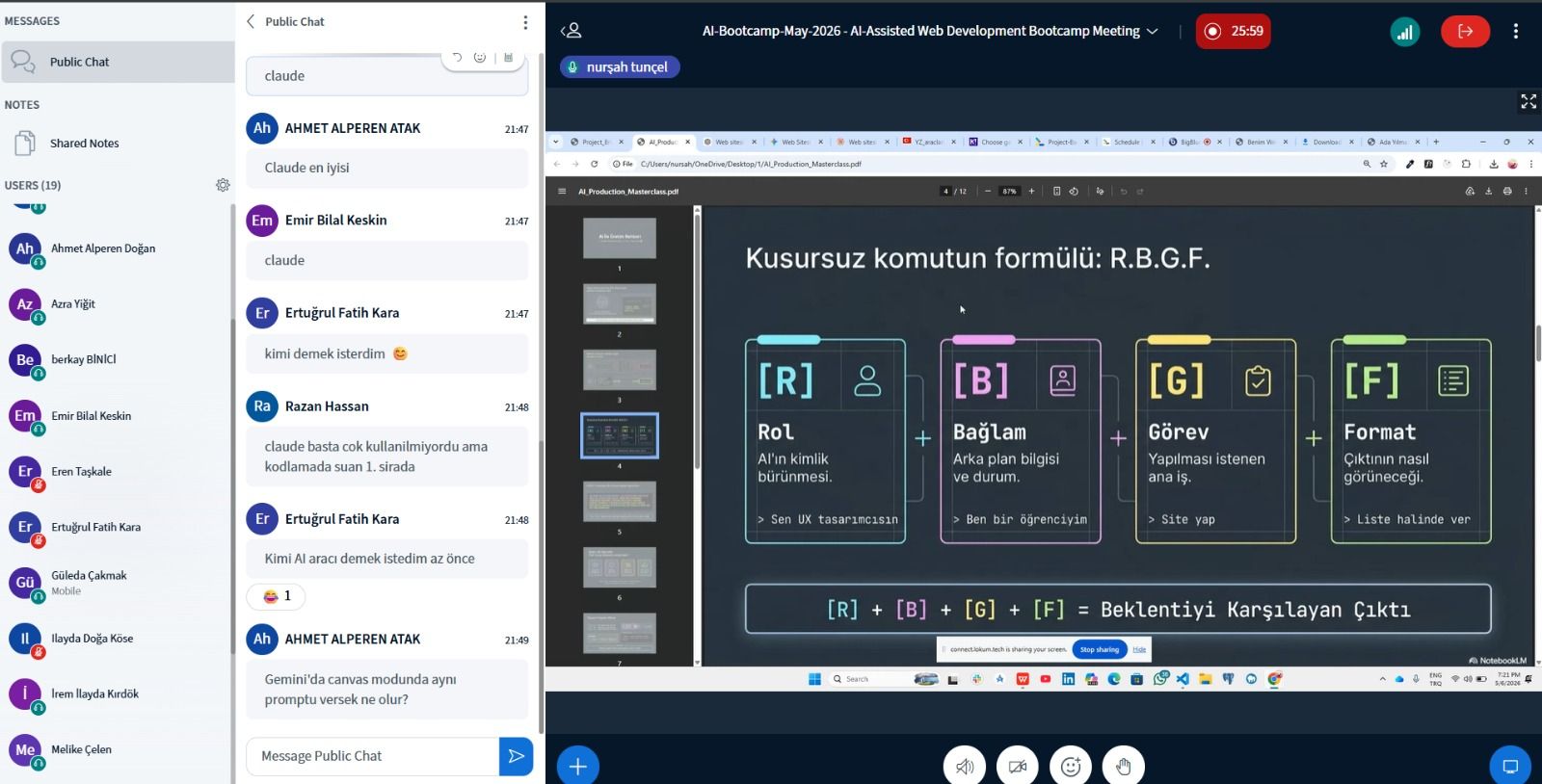
The opening session sets the stage. Students learn what artificial intelligence actually means (not the sci-fi version), what Large Language Models are, and critically, why AI output quality depends heavily on the quality of your prompt.
The most important concept introduced on day one is the Task + Context + Format framework:
- Task defines what you want the AI to do
- Context gives the AI the background it needs
- Format tells the AI how to structure the output
One line from the session that stuck with nearly every participant:
"Confident AI output does not automatically mean correct output."
That idea — that verification is a core engineering skill — sets the tone for everything that comes after, especially in Week 2 when students start reviewing generated code.
Session 2: Model Landscape and Advanced Prompting
The second session widens the lens. Students explore the different types of AI models available today — text models like Claude and ChatGPT, image generators like Midjourney, coding-focused systems, local models, and multimodal systems like Gemini — and learn when to use which.
They also practice three prompting techniques that make a real difference:
-
**Role assignment** — telling the AI who it is before giving it a task -
**Few-shot prompting** — showing the AI examples of the output you want -
**Output formatting** — constraining the response shape (bullet points, tables, specific word counts)
Students used these techniques to generate portfolio content: hero section copy, "About Me" paragraphs, project card descriptions, and visual design prompts. By the end of the session, the quality difference between their first and last prompt was visible to everyone in the room.
Session 3: AI Tools and Installation Day
This session bridges theory and practice. Students are introduced to four categories of AI tools — chat interfaces, agentic coding tools, design-to-code systems, and local AI runners — and then install the actual tools they'll use in Week 2:
- Node.js (runtime)
- Antigravity (agentic coding tool)
- Google Stitch (AI-powered design generation)
The session ended with a live demo that showed the complete workflow for the first time:
- Generate a portfolio hero section design in Google Stitch
- Export the design
- Convert it into working frontend code using Antigravity
- Review the generated code diff
- Run the project locally at
localhost:3000
For most learners, this was the first time they saw AI-generated design turn into functional code in real time. The room went quiet, then noisy — in the best possible way.
Week 2: Building — Hands-On AI-Assisted Development
Week 2 is where students stop watching and start building. Every session focuses on producing one small, working slice of their portfolio.
Session 4: Designing a Portfolio Section with Google Stitch
Learners create their own portfolio hero designs. They write design briefs, experiment with visual prompting, refine palettes and typography, and iterate until they have something ready for code conversion.
One important lesson from this session: image prompting is fundamentally different from text prompting. Instead of giving instructions ("make a nice header"), students learned to use rich descriptive language — specifying lighting, spacing, color tones, visual hierarchy, and mood.
Session 5: Converting Design to Code with Antigravity
Working with a real tech stack — Next.js 15, TypeScript, Sass Modules, and Framer Motion — students used structured prompts to generate frontend components from their Stitch designs. They reviewed generated code, iterated on UI adjustments, and learned engineering concepts like Server Components, Client Components, responsive design, semantic HTML, and accessibility.
The most impactful moment? Comparing AI-generated outputs with and without AI "skills" enabled. Skills are pre-written expert instruction layers that dramatically improve output consistency and quality. Seeing the difference firsthand helped students understand why context and structure matter more than just asking the AI to "make it look good."
This design-to-code workflow mirrors how production teams increasingly ship — using AI to accelerate the path from design intent to working frontend.
Session 6: Debugging, Code Review, and SEO
The final session focuses on arguably the most important real-world skill: debugging.
Students learn a structured bug-reporting formula:
- Expected behavior — what should have happened
- Actual behavior — what actually happened
- Last change — what you did right before things broke
- Relevant files — which files are involved
- Exact error — the precise error message
They also practice AI-assisted code review, accessibility auditing, performance analysis, and search engine optimization — including generating metadata, OpenGraph tags, and JSON-LD structured data for their portfolios.
AI Bootcamp vs. Traditional Coding Programs: What's Different?
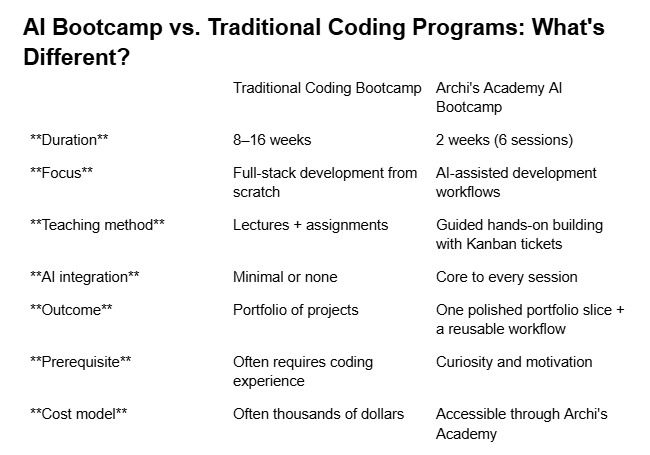
The distinction matters. This isn't a watered-down coding bootcamp. It's a fundamentally different kind of program that teaches students how to collaborate with AI tools — a skill set that's increasingly separate from (and complementary to) traditional programming.
The Educational Philosophy: Honesty Over Hyp
We should be direct about what this bootcamp doesn't promise.
It doesn't claim to turn participants into professional engineers in two weeks. It doesn't pretend that AI replaces the need to understand fundamentals. And it doesn't sell the fantasy that you can build a production app by typing a few prompts.
What it does promise — and deliver — is this:
- Students understand the AI-assisted product workflow from end to end
- They build genuine confidence using modern AI tools
- They create a functional project slice they can continue building
- They learn how to communicate effectively with AI systems
- They develop verification and debugging habits that transfer to any engineering context
- They gain a foundation for continued self-learning
That "workflow-first" approach reflects how modern product teams actually operate. And for students still figuring out what they want to build, having a clear mental model of the process is often more valuable than memorizing syntax.
Why We Chose Portfolio Websites as the Running Example
The portfolio project was a deliberate choice, not a default.
It's personally relevant — every student can relate to building something that represents them. It maps naturally onto the entire workflow we wanted to teach: design, prompting, frontend code generation, layout refinement, responsive behavior, accessibility, and SEO. And most importantly, it's something students can keep building after the bootcamp ends.
We intentionally avoided generic demo projects. There's nothing motivating about building a to-do app you'll never open again. A portfolio, on the other hand, is something students might actually deploy and share with a recruiter.
What Comes Next
This kickoff cohort is the beginning of a broader AI-focused training direction at Archi's Academy.
Future iterations are expected to expand into:
- Advanced frontend generation workflows
- Backend integration and real data handling
- Authentication and authorization systems
- Multi-agent AI workflows
- Deployment pipelines and CI/CD
- Collaborative product development simulations
The long-term goal is to help students build AI-native development habits that match how the industry is actually moving. Not AI as a novelty — AI as a daily tool inside a real engineering workflow.
For students interested in going deeper, this bootcamp serves as a natural entry point into Archi's Academy's broader skill tracks in frontend, backend, and QA development.
Frequently Asked Questions
What is the AI bootcamp at Archi's Academy?
It's a 2-week, 6-session training program that teaches university students how to use AI tools inside a real product development workflow — from prompting and design to code generation, debugging, and SEO.
Do I need coding experience to join the bootcamp?
No. The program is designed for beginners with no prior coding experience. Selection is based on motivation and curiosity, not technical prerequisites.
Which AI tools do students use during the bootcamp?
Participants work with Google Stitch for AI-powered design generation and Antigravity for AI-assisted frontend development. The tech stack includes Next.js 15, TypeScript, Sass Modules, and Framer Motion.
Which universities participated in the first cohort?
The kickoff cohort included students from Aydın University, Beykent University, Arel University, and Atlas University in Turkey.
What do students build during the bootcamp?
Every participant builds a slice of a personal portfolio website — a hero section, design brief, and supporting content — using the full AI-assisted workflow from design to code to optimization.
Want to explore the tools mentioned in this article? Start with Google Stitch for AI design, Antigravity for coding, Next.js for frontend development, and Node.js to set up your local environment. For questions about joining future cohorts or partnering as a university, reach out to the Archi's Academy team.

Pazartesi, May 11, 2026