
button-icon

Iniciarsesión

Iniciarsesión
Archi's Academy
    Cursos
    Cursos
    #
  • Proyectos
    Proyectos
  • Archi's Academy

    Tracks

    #
  • Blog
    Blog
  • Precios
    Precios
  • Contacto
    Contacto
  • Para clubs universitarios
    Para clubs universitarios

BLACK FRIDAY

85% de descuento durante todo noviembre

whatsapp
Contáctanos
Archi's Academy

Navegación

  • Cursos
  • Proyectos
  • Blog
  • Precios
  • Para clubs universitarios
  • Contacto

Cursos

    Tracks

    • Desarrollo Frontend
    • Desarrollo Backend
    • Control de Calidad (QA)
    • Programación con IA Agentica y LLMs
    • Desarrollo Móvil
    • DevOps

    Legal

    • Política de privacidad
    • Términos de servicio

    Contacto

    +1 (217) 200 90 93
    Suite No: 8, 400 Emmet Street
    Kissimmee, Florida 34741 USA
    [email protected]

    Copyright © Tech Career Yazılım Danışmanlık A.Ş. 2026

    instagramlinkedingithubyoutubexfacebook
    visamastercardstripeiyzicoamerican-express
    ETBIS
    1. Home›
    2. Blog›
    3. Features of Cypress.io

    Features of Cypress.io

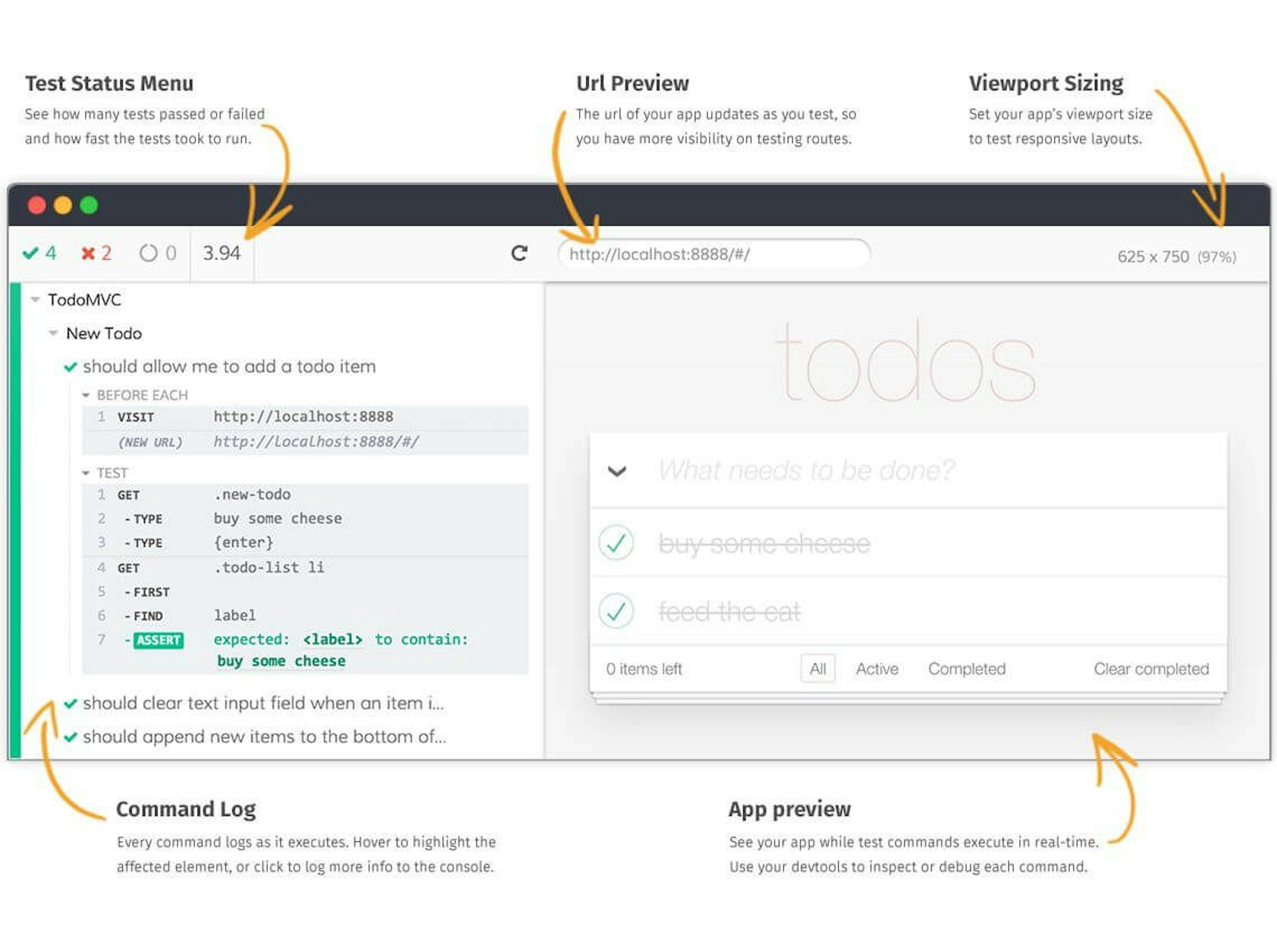
    Today let's see one of the prime features of Cypress.io, the Test Runner. Cypress runs tests in a unique interactive runner that allows us to see commands as it executes while also viewing the application under test.
    So what are the components of the Test Runner?
    1. The lefthand side of the Test Runner is a visual representation of the test suite. Each test block is properly nested and each test, when clicked, displays every Cypress command and assertion executed within the test’s block as well as any command or assertion executed in relevant before, beforeEach, afterEach, and after hooks.
    2. Each command and assertion, when hovered over, restore the Application Under Test (righthand side) to the state it was in when that command was executed. This allows you to ‘time-travel’ back to previous states of your application when testing.
    By default, Cypress keeps 50 tests worth of snapshots and command data for time traveling. Cypress prints several pieces of information when an error occurs during a Cypress test: Error name, Error message, Learn more, Code frame file, Code Frame, View stack trace, and Print to console button. For more details, please visit https://www.cypress.io/
    aswathi-prathap-archis-traimee

    Aswathi Prathap

    Cuma, Oca 8, 2021

    ¿Listo para convertir el conocimiento en habilidades reales?

    Empieza a construir con formación guiada por proyectos y gana experiencia práctica desde el primer día.

    TOC

    Table of Content

    No sections found